
By Dimitris Lampriadis on 14 May, 2023

In the following article, we will explore how to use Snowflake's SPLIT_TO_TABLE table function to split a string into a table and provide an example to demonstrate its capabilities.
In addition to that, we will explore the LATERAL keyword as well, and combine it with the table function.
SPLIT_TO_TABLE
This function can be used to split a string (based on a specified delimiter) into a table and flatten the results into rows. It can be useful for parsing CSV files or breaking down multi-valued fields.
The syntax of the function is the following:
SPLIT_TO_TABLE( input_string, delimiter )
Where input_string is the string to be split, and delimiter is the character or string used to split the string. The delimiter parameter is optional, and if omitted, Snowflake uses a comma as the default delimiter.
Example
Let's say we have a table with a column called `tags`, which contains a list of tags for each record, separated by commas. We want to split these tags into a separate table so that we can perform analysis on them. Here's how we can use the SPLIT_TO_TABLE function to accomplish this:
CREATE OR REPLACE TABLE

  sample_table (

  id INT,

  tags VARCHAR)

;
INSERT INTO sample_table (id, tags)

VALUES

  (1, 'apple,banana,orange'),

  (2, 'chicken,beef,pork'),

  (3, 'red,green,blue')

;
The table looks like the following:
If we want to split the tags column into different rows we use the split_to_table function as:
CREATE TABLE tags_table AS

SELECT

    sample_table.id

  , tags_array.value

FROM sample_table,

     LATERAL SPLIT_TO_TABLE(tags, ',') AS tags_array

;
The created table looks like:
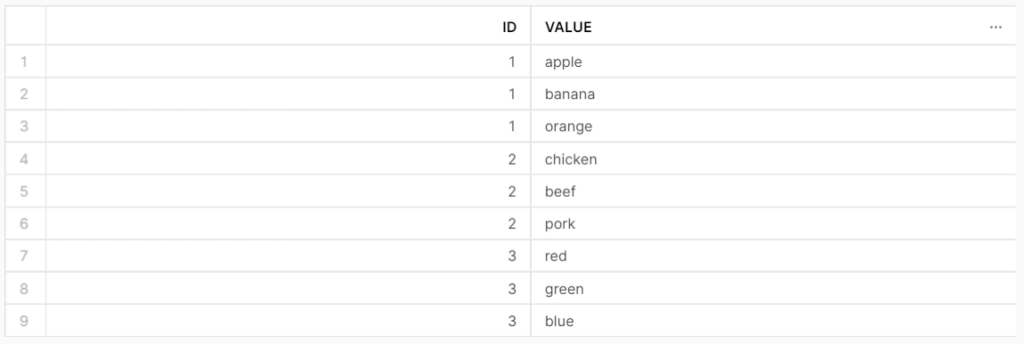
In this example, we first create a sample table with two columns: `id` and `tags`. We then insert some sample data into this table. Next, we use the SPLIT_TO_TABLE function to split the `tags` column into an array of tags, and then use the `LATERAL` join syntax to convert the array into a table. We insert these into a new table called `tags_table`.
LATERAL
But wait we used also LATERAL along with the function. What LATERAL is and what is it doing?
In a FROM clause, the LATERAL keyword allows an inline view to reference columns from a table expression that precedes that inline view.
A lateral join behaves more like a correlated subquery than like most JOINs. A lateral join behaves as if the server executed a loop similar to the following:
for each row in left_hand_table (LHT):

    execute right_hand_subquery (RHS) using the values from the current row in the LHT
Unlike the output of a non-lateral join, the output from a lateral join includes only the rows generated from the inline view. The rows on the left-hand side do not need to be joined to the right hand side because the rows on the left-hand side have already been taken into account by being passed into the inline view.
Conclusion
In summary, the Snowflake built-in function SPLIT_TO_TABLE can be a useful tool for parsing CSV files, breaking down multi-valued fields into separate tables, or splitting arrays with multiple data in a record. By using this function in combination with other Snowflake SQL statements, you can easily manipulate and analyze your data.
Useful links:

Snowflake's Security Measures against Cyber Threats

Semi-Structured Data with Snowflake's Variant Data Type